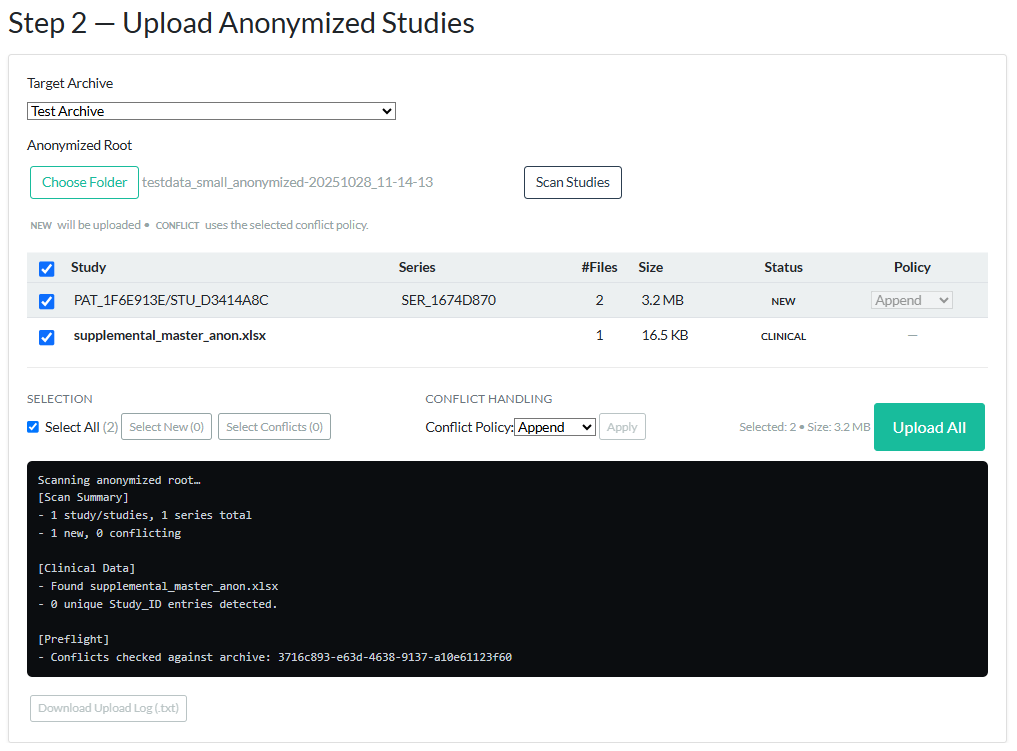
Step 2 Panel – Upload of Anonymized Studies
The Step 2 panel is used to scan the anonymized output folder created in Step 1, review detected anonymized studies and series, resolve upload conflicts, and upload the selected anonymized data to the chosen ZODIAC archive.
- Target archive dropdown, where the user selects the archive to which the anonymized data will be uploaded.
- Anonymized root folder selector, which points to the local destination folder created during Step 1. This folder contains the anonymized DICOM files and, if provided, the anonymized clinical data file.
- “Scan Studies” button. The scan reads the anonymized DICOM metadata, detects patient/study/series groups, checks that the anonymized DICOM values meet the required upload conditions, identifies the anonymized clinical file if present, and checks for existing items in the selected archive.
-
Interactive table showing detected anonymized studies and series
with:
- Status (
NEWorCONFLICT) - Number of files and total size
- Selection checkbox
-
Conflict policy
(
Append,Overwrite, orSkip)
- Status (
-
Clinical metadata row, if an anonymized clinical file is detected.
Clinical data is matched to DICOM data using the combination of
Patient_ID + Study_ID. The sameStudy_IDmay appear for different patients. - Bulk selection and conflict handling tools, which allow the user to select new items, select conflicting items, and apply a conflict policy where applicable.
-
“Upload All” button. Only the selected anonymized DICOM series
and matching anonymized clinical metadata are transmitted to the platform. During
upload, the relevant clinical row(s) are attached to the corresponding
Patient_ID + Study_IDgroup. -
Upload progress log, which shows scan, preflight, upload, conflict
handling, and clinical metadata attachment results. The upload log is downloadable
as a
.txtfile.
Only after the user explicitly selects items and clicks “Upload All” in Step 2 is anonymized data transmitted to the ZODIAC platform.
Original DICOM files, original clinical data, and local mapping or traceability files are not uploaded. This separation gives the participating institute control over what is transmitted and ensures that upload occurs only after local anonymization and review.